

TwoCents App Troubleshooting & FAQs
Having trouble with the TwoCents app? Most app issues can be resolved by refreshing the app, clearing old website data, or reinstalling TwoCents.
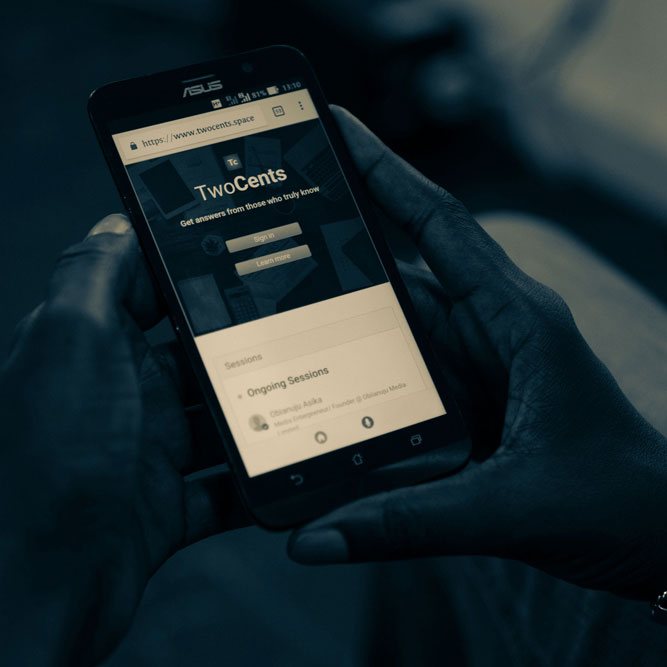
TwoCents currently uses Progressive Web App (PWA) technology. This allows you to install TwoCents on your phone and use it like an app while we work towards releasing dedicated apps on supported app stores.
In some cases, the installed TwoCents app may display a white or blank screen on an iPhone or iPad.
This is usually caused by old website data, cached app files, or an older version of the TwoCents web app remaining on your device.
First, completely close TwoCents and open it again.
If the white screen remains, open Safari and visit TwoCents directly from the browser.
If TwoCents works correctly in Safari but the installed app still shows a white screen, remove the installed TwoCents app from your Home Screen and install it again from the TwoCents Download page.
If the issue continues, clear the stored website data for TwoCents using the instructions in the section below.
TwoCents currently uses Progressive Web App technology.
A Progressive Web App, or PWA, allows a website to be installed on supported phones and used in a way that is similar to a traditional mobile app.
This allows us to improve TwoCents quickly and make new features available without requiring users to repeatedly download large app updates.
We are continuing to build and improve the TwoCents mobile experience. Dedicated apps for supported app stores are planned for the future.
Until then, you can install TwoCents directly from our Download page and add it to your phone.
Occasionally, you may notice that a page appears before all its colours, buttons, images, spacing, or other visual elements have finished loading.
You may also briefly see a page that looks incomplete or incorrectly formatted.
This can happen when the app is still loading the files required to display the TwoCents interface correctly.
Slow or unstable internet connections can make this more noticeable. Old cached files on your device may also occasionally cause the app to load an older version of part of the interface.
In most cases, wait a few seconds for the page to finish loading. If the page still does not display correctly, close and reopen the app.
If the problem happens repeatedly, clear the stored data for TwoCents or reinstall the app.
The exact steps may be slightly different depending on your Android phone and browser.
If you use Google Chrome:
- Open Chrome.
- Tap the three-dot menu.
- Open Settings.
- Open Site settings.
- Open All sites or Stored data.
- Find TwoCents.
- Clear or delete the stored data for TwoCents.
After clearing the data, open TwoCents again.
You may be asked to sign in again because locally stored login or website information may have been removed.
If you installed TwoCents on your Home Screen and the issue continues, uninstall the installed TwoCents app and install it again from the Download page.
On an iPhone or iPad, TwoCents website data is managed through Safari.
To remove stored data for TwoCents:
- Open the Settings app on your device.
- Open Safari.
- Open Advanced.
- Open Website Data.
- Search for TwoCents or twocents.space.
- Delete the stored website data for TwoCents.
Depending on your version of iOS, Safari settings may appear under Settings > Apps > Safari.
After deleting the website data, open TwoCents again.
You may need to sign in again.
If you installed TwoCents on your Home Screen and the problem continues, remove the TwoCents app from your Home Screen and install it again.
Because TwoCents is currently a Progressive Web App, some app files may be temporarily stored on your device.
After a TwoCents update, your device may occasionally continue using an older stored version of certain files for a short period.
Close TwoCents completely and open it again. In many cases, the latest version will load automatically.
If you continue seeing an older interface or an issue that has already been fixed, clear the stored TwoCents website data on your device.
You can also remove and reinstall the TwoCents app.
If TwoCents works correctly in your browser but the installed app is not working correctly, the installed version may be using old stored data.
First, completely close and reopen the installed app.
If the issue continues, remove the installed TwoCents app from your device and install it again from the TwoCents Download page.
Reinstalling the app does not delete your TwoCents account, insights, earnings, followers, messages, or other information stored on TwoCents.
You may simply need to sign in again.
No. Uninstalling the TwoCents app from your phone does not delete your TwoCents account.
Your insights, profile, followers, earnings, scores, messages, subscriptions, and other account information remain on TwoCents.
After reinstalling the app, simply sign in to your account again.
If you have forgotten your password, use the password reset option on the sign-in page.
TwoCents requires an internet connection for most features.
Although some app files may be stored temporarily on your device, features such as loading new insights, publishing content, commenting, sending messages, viewing updated earnings, and interacting with the community require an active internet connection.
If TwoCents appears stuck or does not update, check your mobile data or Wi-Fi connection and try again.
You may occasionally be asked to sign in again if your login session expires or stored website data is removed from your device.
Clearing TwoCents website data, clearing browser data, changing certain browser settings, or reinstalling the app may also require you to sign in again.
Being signed out does not delete your TwoCents account or content.
Notification support may depend on your device, browser, operating system, and notification permissions.
Check that notifications are allowed for TwoCents in your device settings.
Also check your TwoCents notification and email preferences to make sure the notifications you want to receive are enabled.
Some devices may limit background activity or notifications to save battery. Battery-saving settings may therefore affect how quickly notifications appear.
The installation process depends on your device and browser.
On Android, we recommend opening the TwoCents Download page using a supported browser such as Google Chrome.
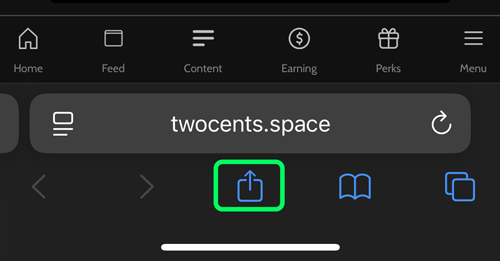
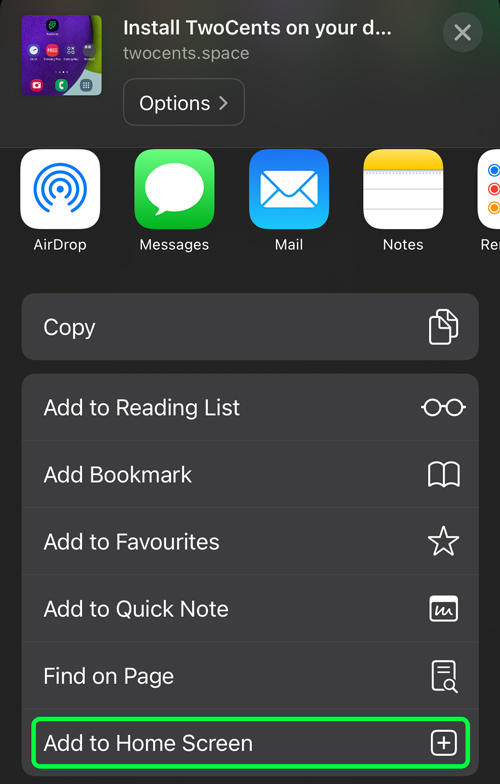
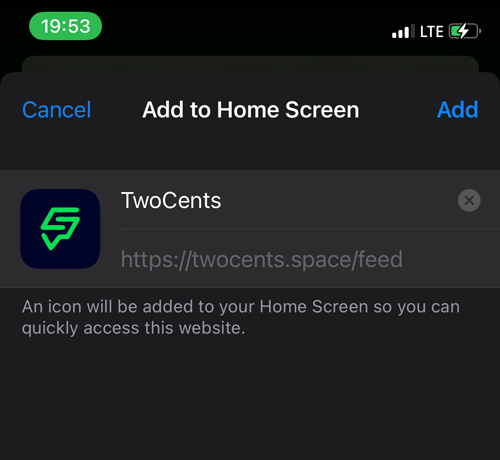
On an iPhone or iPad, open TwoCents in Safari and use the Add to Home Screen option from Safari's Share menu.
If TwoCents is already installed on your device, the install option may no longer be displayed.
If the issue continues after closing and reopening the app, clearing old website data, and reinstalling TwoCents, please contact us.
When reporting an app problem, please include:
- The type of phone or device you are using
- Your operating system, if you know it
- The browser you used to install TwoCents
- A short description of the problem
- A screenshot or screen recording, if possible
The more information you provide, the easier it is for us to investigate and resolve the problem.
You can contact us at hello@twocents.space.
Feeling lost? Not sure where to start? Or perhaps you need some assitance with the app or website?
Join our Onboarding and Techical Support groups on WhatsApp and get instant answers and help.