Score |
91


Ikojo
 Student @ Prince abubakar audu university
Student @ Prince abubakar audu university



Why You should learn HTML
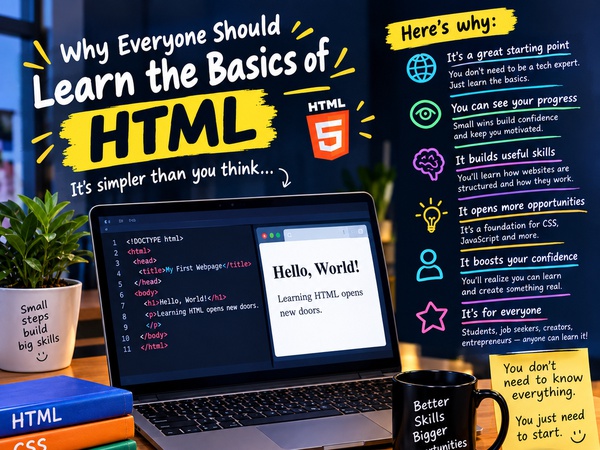
<p>💻 Why I Think Everyone Should Learn the Basics of HTML</p><p><br/></p><p>When people hear the word coding, many immediately think:</p><p><br/></p><p>“That's too difficult.”</p><p><br/></p><p>“I don't understand computers.”</p><p><br/></p><p>“Coding is only for programmers.”</p><p><br/></p><p>“I could never do that.”</p><p><br/></p><p>But I think many people would be surprised by how simple it can be to take the first step.</p><p><br/></p><p>You don't have to start by building a complicated application or creating the next big social media platform.</p><p><br/></p><p>You can start with something as simple as creating a webpage.</p><p><br/></p><p>That's one reason I believe learning the basics of HTML can be a great starting point.</p><p><br/></p><p>🌐 What Exactly Is HTML?</p><p><br/></p><p>HTML stands for HyperText Markup Language.</p><p><br/></p><p>It's one of the basic technologies used to structure webpages.</p><p><br/></p><p>Think about building a house.</p><p><br/></p><p>Before you worry about painting the walls, decorating the rooms or buying furniture, you need the basic structure of the house.</p><p><br/></p><p>HTML works in a similar way for webpages.</p><p><br/></p><p>It helps organize things such as:</p><p><br/></p><p>Headings</p><p><br/></p><p>Paragraphs</p><p><br/></p><p>Images</p><p><br/></p><p>Links</p><p><br/></p><p>Lists</p><p><br/></p><p>Tables</p><p><br/></p><p>Forms</p><p><br/></p><p>And many other elements.</p><p><br/></p><p>Once you begin understanding HTML, you may start looking at websites differently.</p><p><br/></p><p>Instead of simply seeing a webpage, you might start asking:</p><p><br/></p><p>“How did they build this?”</p><p><br/></p><p>And I think that curiosity is one of the most important parts of learning technology.</p><p><br/></p><p>👀 Start With Something Simple</p><p><br/></p><p>One thing I like about HTML for beginners is that you can see your progress quickly.</p><p><br/></p><p>Imagine writing:</p><p><br/></p><p>"<h1>Welcome to My Website</h1>"</p><p><br/></p><p>Then opening your file in a browser and seeing the heading appear.</p><p><br/></p><p>It may look simple.</p><p><br/></p><p>But when you're learning, small victories matter.</p><p><br/></p><p>Then you can add a paragraph.</p><p><br/></p><p>Add an image.</p><p><br/></p><p>Create a link.</p><p><br/></p><p>Make a list.</p><p><br/></p><p>Create a simple form.</p><p><br/></p><p>Suddenly, you've created a basic webpage.</p><p><br/></p><p>You're no longer just reading about websites.</p><p><br/></p><p>You've actually built one.</p><p><br/></p><p>That feeling can give you the motivation to keep learning.</p><p><br/></p><p>🧠 You Don't Need to Know Everything</p><p><br/></p><p>One mistake beginners often make is thinking they need to memorize everything.</p><p><br/></p><p>You don't.</p><p><br/></p><p>You don't need to know every HTML tag on your first day.</p><p><br/></p><p>You don't need to understand everything immediately.</p><p><br/></p><p>You need to understand the basics and keep practicing.</p><p><br/></p><p>Even experienced developers don't remember every single thing.</p><p><br/></p><p>Sometimes they check documentation.</p><p><br/></p><p>Sometimes they search for examples.</p><p><br/></p><p>Sometimes they ask questions.</p><p><br/></p><p>The important skill isn't knowing every answer.</p><p><br/></p><p>It's knowing how to find the answer and understand it.</p><p><br/></p><p>📚 Learning HTML Can Build Confidence</p><p><br/></p><p>Learning HTML isn't only about technology.</p><p><br/></p><p>It can also build confidence.</p><p><br/></p><p>Imagine someone who has never written code before.</p><p><br/></p><p>They create their first webpage.</p><p><br/></p><p>Then they add an image.</p><p><br/></p><p>Then they create a link.</p><p><br/></p><p>Then they make a small personal website.</p><p><br/></p><p>Eventually they look at it and think:</p><p><br/></p><p>“Wait... I actually built this.”</p><p><br/></p><p>That moment can change the way you see yourself.</p><p><br/></p><p>Something that once looked complicated suddenly becomes something you can understand.</p><p><br/></p><p>And that confidence can encourage you to learn something else.</p><p><br/></p><p>Maybe CSS.</p><p><br/></p><p>Maybe JavaScript.</p><p><br/></p><p>Maybe another programming language.</p><p><br/></p><p>One skill can lead to another.</p><p><br/></p><p>👨🏫 What Teaching Beginners Has Taught Me</p><p><br/></p><p>I'm also currently teaching beginners the basics of HTML, and that experience has taught me a lot.</p><p><br/></p><p>One thing I've noticed is that people often underestimate themselves.</p><p><br/></p><p>Someone might say:</p><p><br/></p><p>“I don't think I can code.”</p><p><br/></p><p>Then they try it.</p><p><br/></p><p>They write their first few lines.</p><p><br/></p><p>They see the result.</p><p><br/></p><p>And suddenly they realize:</p><p><br/></p><p>“I can actually do this.”</p><p><br/></p><p>Teaching has also reminded me that everyone learns differently.</p><p><br/></p><p>Some people understand quickly.</p><p><br/></p><p>Others need more explanation.</p><p><br/></p><p>Some learn by watching.</p><p><br/></p><p>Others learn by practicing.</p><p><br/></p><p>Some need to make mistakes before the concept finally makes sense.</p><p><br/></p><p>That's completely normal.</p><p><br/></p><p>Learning isn't a competition.</p><p><br/></p><p>You don't have to understand something at the same speed as somebody else.</p><p><br/></p><p>🚀 HTML Is Only the Beginning</p><p><br/></p><p>HTML isn't the entire world of web development.</p><p><br/></p><p>As you continue learning, you'll encounter technologies like CSS and JavaScript.</p><p><br/></p><p>CSS helps control the appearance and styling of webpages.</p><p><br/></p><p>JavaScript can add interaction and dynamic behavior.</p><p><br/></p><p>But HTML gives beginners a useful foundation for understanding webpage structure.</p><p><br/></p><p>You don't need to learn everything at once.</p><p><br/></p><p>Take it step by step.</p><p><br/></p><p>First understand the structure.</p><p><br/></p><p>Then learn how to style it.</p><p><br/></p><p>Then learn how to make it interactive.</p><p><br/></p><p>One step at a time.</p><p><br/></p><p>🌱 Don't Be Afraid of Your First Project</p><p><br/></p><p>If you're learning HTML, don't worry if your first website looks simple.</p><p><br/></p><p>It probably will.</p><p><br/></p><p>And that's okay.</p><p><br/></p><p>Your first website isn't supposed to compete with professional websites.</p><p><br/></p><p>It's supposed to teach you.</p><p><br/></p><p>Create a webpage about yourself.</p><p><br/></p><p>Add your name.</p><p><br/></p><p>Write a short introduction.</p><p><br/></p><p>Add your hobbies.</p><p><br/></p><p>Add your goals.</p><p><br/></p><p>Add an image.</p><p><br/></p><p>Add a link.</p><p><br/></p><p>Then improve it.</p><p><br/></p><p>Change something.</p><p><br/></p><p>Break something.</p><p><br/></p><p>Fix it.</p><p><br/></p><p>Add something new.</p><p><br/></p><p>That's how you learn.</p><p><br/></p><p>Your first project isn't supposed to be perfect.</p><p><br/></p><p>It's supposed to be your first project.</p><p><br/></p><p>💡 My Advice to Beginners</p><p><br/></p><p>If you've always wanted to learn coding but you've been afraid, start small.</p><p><br/></p><p>Don't wait until you have everything figured out.</p><p><br/></p><p>Don't wait until you're extremely intelligent.</p><p><br/></p><p>Don't wait until you have hours of free time.</p><p><br/></p><p>Start with what you have.</p><p><br/></p><p>Learn one concept.</p><p><br/></p><p>Practice it.</p><p><br/></p><p>Build something small.</p><p><br/></p><p>Then learn the next concept.</p><p><br/></p><p>Over time, those small lessons can become a real skill.</p><p><br/></p><p>🔥 Here's a Challenge</p><p><br/></p><p>If you've never written HTML before, try creating a simple webpage about yourself.</p><p><br/></p><p>Include:</p><p><br/></p><p>👤 Your name</p><p>📝 A short introduction</p><p>🎯 Your goals</p><p>🎨 Your hobbies</p><p>📚 Something you're learning</p><p>🔗 A link to something you like</p><p>🖼️ An image</p><p><br/></p><p>Don't worry about making it beautiful.</p><p><br/></p><p>Just make it work.</p><p><br/></p><p>Then improve it as you learn more.</p><p><br/></p><p>Because there's a big difference between saying:</p><p><br/></p><p>“I don't know how to code.”</p><p><br/></p><p>and saying:</p><p><br/></p><p>“I'm learning how to build websites.”</p><p><br/></p><p>💬 Let's Talk</p><p><br/></p><p>Have you ever tried learning HTML or coding?</p><p><br/></p><p>If yes, what was the hardest part?</p><p><br/></p><p>If you've never tried, what has stopped you?</p><p><br/></p><p>Is it:</p><p><br/></p><p>💻 Not having a computer?</p><p><br/></p><p>😰 Thinking it's too difficult?</p><p><br/></p><p>⏰ Not having enough time?</p><p><br/></p><p>🤔 Not knowing where to start?</p><p><br/></p><p>Or something else?</p><p><br/></p><p>Tell me in the comments.</p><p><br/></p><p>And if you're already learning technology, share one piece of advice you'd give a complete beginner.</p><p><br/></p><p>You never know who might read your comment and decide to take their first step.</p><p><br/></p><p>Everyone starts somewhere.</p><p><br/></p><p>You don't have to know everything today.</p><p><br/></p><p>You just need to be willing to learn something new tomorrow. 🚀</p>


 52
52


Other insights from Ikojo





Contributor Points
Points-to-Coupons

Referral Earning

Insights for you.


My Unpopular opinions of Social Media.
I Really Hate Social MediaWait, hear me out.I'm not saying this from a place of pride o...
254 views
33 upvotes
40 comments

New York City bans AI for children.
AI is a very powerful tool.But should young children have unrestricted access to it?On ...
108 views
29 upvotes
34 comments


Meet Amina the AI
Well yes, the image attached to this post was created with DALLE. After some interestin...
1493 views
20 upvotes
12 comments


If You Can’t Beat Them, Join Them
I didn’t experience the “before.” Before landlines, before phones, before mobile money—...
343 views
28 upvotes
25 comments


Grandpa lied (A little)
"Grandpa said, farming pays and not even your AI can take that away" that was my cousin...
347 views
25 upvotes
26 comments


Social Media vs Reality – Let’s Be Fo...
Let’s talk. Be honest, have you ever looked at someone’s Instagram story and immediatel...
455 views
15 upvotes
15 comments

Are we becoming who we are, or who we...
We are shaped long before we realize itby things we do not question,by voices we do not...
324 views
19 upvotes
20 comments


Three (3) reasons why AI is losing to...
This article explains how Google's new policy affects AI-written content and flagging g...
862 views
18 upvotes
18 comments

Over sharing with a bot : it's not th...
Lately I’ve realized my most stable relationship might actually be with ChatGPT. 😭 I co...
477 views
16 upvotes
16 comments


The Impact Of Social Media vs Books: ...
A social media personality emerged on the internet months ago and a basic small toy tha...
409 views
19 upvotes
15 comments